Showing posts with label tips. Show all posts

Saturday, December 10, 2011

Ucapan Natal Dan Tahun Baru 2012 | SMS | Kata Kata Mutiara

Ucapan Natal Dan Tahun Baru 2012 | SMS | Kata Kata Mutiara - Natal dan Tahun Bau identik dengan hari libur yang panjang mari sambut hadirnya dengan memberikan ucapan selamat kepada teman sahabat saudara atau teman dekat kita dengan penuh keikhlasan. Sehubungan dengan perayaan hari natal dan tahun baru ini kami ingin berbagi kata kata mutiara tahun baru dan ucapan Natal serta Ucapan Tahun Baru 2012 yang bisa disampaikan dengan kartu pos atau disampaikan lewat surat atau yang paling sederhana adalah dengan menyampaikan lewat SMS atau Status Di Twitter, Fb. Menjelang Natal dan Tahun baru bila tidak menyampaikan ucapan rasanya menjadi tidak lengkap bukan?

Berikut ini adalah ucapan natal dan tahun baru 2012,  sampaikanlah untuk teman, sahabat, kerabat dan teman kerja anda atau keluarga tercinta :

Natal Telah Tiba
Sambut hadirnya dengan berbagi kasih dengan sesama
Tahun baru telah tiba
Saatnya membuka lembar harapan baru yang bersih dan suci
Hapus kenangan buruk dimasa yang telah lalu

------------------------------------------------

Saatnya berbagi dengan sesama
dikala Tuhan membagi kasihnya tanpa henti
Kepada manusia
Merry Christmast...

----------------------------------------------------

Selamat Tahun Baru 2012
Semoga tahun ini harapan baru akan terwujud
Mimpi buruk tahun lalu dikubur sedalam dalamnya
Tidak Lupa aku ucapkan Selamat Natal
Semoga Kasih Tuhan Menyertaimu Sepanjang Langkah Tahun 2012

--------------------------------------------

Tahun 2012 tahun perhitungan
Sudahkah kau perhitungkan  amal burukmu
Sehingga bisa mempertimbangkan
untuk intropeksi di tahun 2012
Selamat Natal dan Tahun Baru 2012
Semoga tahun ini lebih baik

Itulah beberapa kumpulan kata kata mutiara dan sms ucapan tahun baru dan ucapan Natal 2012. semoga bisa menjadi bahan referensi anda dalam menyampaikan ucapan natal dan tahun baru 2012.
Read more »

IDE kreatif untuk membuat kartu natal bersama anak dan keluarga


Bberikut adala daftar lima lima ide kreatif untuk membuat kartu natal bersama anak- anak dan keluarga.
1. Gunakan foto lama
Dalam membuat kartu Natal sendiri, Anda dapat menunjukkan rasa humor di kartu untuk orang yang Anda sayangi dengan menggunakan foto lama. Anda bisa menggunakan foto saat dia dan Anda masih kecil, atau foto yang memang memiliki kenangan manis. Dengan menaruh foto lama, Anda dapat membuatnya tersenyum saat mengingat kenangan di foto tersebut.
2. Biarkan Anak yang Menggambar
Membeli kartu kosong merupakan salah satu ide menarik. Anda dapat kreasikan sendiri ucapan Natal dalam kartu tersebut bersama anak-anak Anda. Untuk anak-anak yang sudah cukup besar dan dapat menggambar, biarkan mereka menghias kartu Natal sesuka hati. Mereka dapat menggambar sebuah pohon Natal, malaikat, bintang atau Santa Claus. Anak-anak seringkali memiliki imajinasi tinggi dan ide-ide cemerlang yang dapat mereka utarakan melalui gambar.
3. Foto Anak
Selain foto lama, Anda juga dapat menggunakan foto terbaru untuk membuat kartu Natal. Dalam pembuatan foto terbaru ini, libatkan anak-anak. Foto anak saat mereka sedang menghias pohon Natal atau membantu Anda membuat kue. Coba ambil gambar yang unik. Misalnya fokus pada kue, namun ada anak sebagai latar belakang.
4. Manfaatkan teknologi canggih
Memang kartu Natal merupakan cara tradisional untuk memberi ucapan selamat, tapi bukan berarti dalam pembuatannya Anda tidak bisa memanfaatkan kecanggihan teknologi. Bagi Anda yang jago menggunakan program seperti Adobe Photoshop, Anda dapat menggunakannya untuk mengeluarkan ide-ide kreatif. Libatkan anak saat Anda membuat desain tersebut, siapa tahu dia bisa memberikan saran.
Memang akan jadi lebih mudah untuk pergi ke toko dan membeli kartu Natal yang sudah tersedia. Namun jika Anda mau sedikit usaha dalam membuat kartu Natal dengan kreasi sendiri dan melibatkan anak-anak Anda, Natal tahun ini akan menjadi lebih berkesan.

Read more »

Tuesday, December 6, 2011

How to Move Ubuntu Window Buttons To Right Side


Enlarge picture
The following tutorial will teach all Ubuntu 10.04 LTS, Ubuntu 10.10, Ubuntu 11.04 and Ubuntu 11.10 users how to move the window buttons to the right side.

At the request of many of our readers, we've created the following tutorial to teach them how to easily move the window buttons from left to right side in the Ubuntu 10.04 LTS (Lucid Lynx), Ubuntu 10.10 (Maverick Meerkat), Ubuntu 11.04 (Natty Narwhal) and Ubuntu 11.10 (Oneiric Ocelot) operating systems.

For Ubuntu 10.04 LTS, Ubuntu 10.10 and Ubuntu 11.04 it was possible to move the buttons to right side with many methods, including Ubuntu Tweak and Gnome-Art Manager, or manually from GConf Editor.

However, because the switch to the GNOME 3 desktop environment, starting with Ubuntu 11.10 (Oneiric Ocelot) the above mentioned methods are obsolete. The only viable method at this time is through a little software called Metacity Window Buttons.

Created by developer Pablo Seminario, Metacity Window Buttons (or Mwbuttons for short) is small tool to easily configure the position and availability of the buttons on the Metacity window.

Step 1 - Download and install Metacity Window Buttons

No matter what Ubuntu operating system you are running, download the Metacity Window Buttons from Softpedia, here, and place it on your desktop.

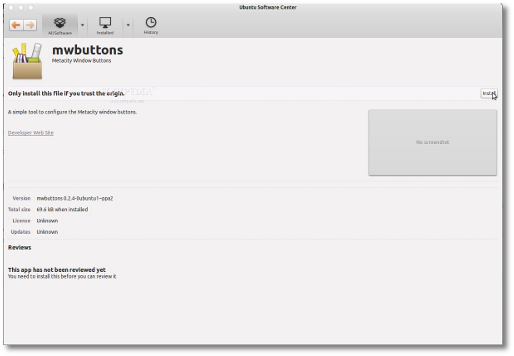
Once the download is over, double click the file, wait for Ubuntu Software Center to start and install the package...

Review image

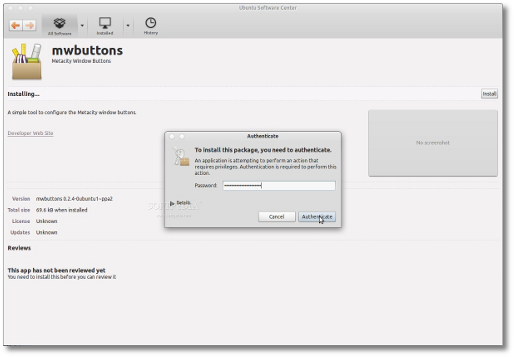
When you will be asked for your password, type it in and wait for the installation to finish...

Review image

Close Ubuntu Software Center when it's done.

Step 2 - Move the window buttons to right side!

Metacity Window Buttons is now fully installed in your Ubuntu machine and can be started from the Applications -> Accessories menu or searched in the Unity Dash.

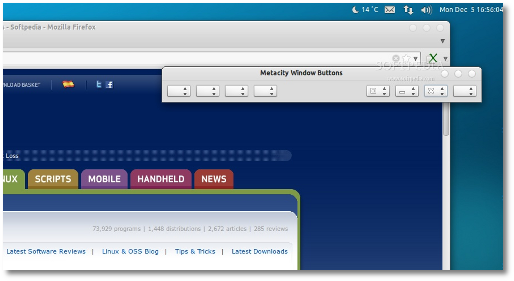
Once the application is started you can immediately and instantly change the position of the window buttons by manually selecting which buttons to place on the right side and which on the left side, or by going to the Setttings -> Karmic Style preset option.

Voila! The window buttons are now on the right side. Enjoy and don't hesitate to comment below if you have problems with the tutorial.
Review image
Read more »

Sunday, October 30, 2011

Netbook Vs Tablet - Making The Right Choice

Netbook vs Tablet - Making the Right Choice

Netbook vs Tablet is an argument without end. Some people think that netbooks better than tablets and capsules, rather than other netbooks.

Netbooks -

Try Mobile offers unsecured business loans International Freephone

Netbooks are lightweight laptops that are known for their portability. Netbooks can be used to browse the Internet and use the basic functions of a computer as a word processor, make calculations and stuff.

Good -

1. Laptop keyboard will be a real (albeit very small).

2. They are quite sturdy, and the screen is protected from the keyboard.

Third Netbooks are relatively cheaper than laptops and tablets.

4. Operating on the Windows or Linux operating system.

5. Netbooks usually have traditional ports such as USB.

The bad -

1. Processors used in netbooks are generally slow, and do multi-tasking.

2. The graphics cards are not generally a commercial graphics or 2000 games was alone.

In the third and out of the old trend.

The fourth most netbooks available without CD / DVD-ROM.

Tablets -

The tablets are touch-screen electronic devices, which are relatively smaller than netbooks and offer the same functionality as a laptop or computer. The size of a tablet is usually larger than a cell phone and smaller than a notebook. People often buy tablets for business and personal use, the main applications of a tablet includes checking emails, surfing the Internet, play with the applications and of course for portability.

The Good -

1. Platform provides a good screen resolution and compared with that of a netbook.

2. The tablets are usually thin and lightweight and can be easily transported from place to place.

Third Each tablet usually works on iOS Apple or Android operating system that offers different types of applications, it may for entertainment, or can it be for business.

4. The tablets are considered fashionable and a must have gadget.

5. Processors used in the tablets are good and easy to do more activities together.

6. Most tablets have two cameras that can be used for video calls and photos by clicking.

Bad -

1. Some people find it difficult to write on a shelf because there is no physical keyboard connected to a tablet. However, people get used to the keyboard over time and there are some Bluetooth keyboards available on the market that are compatible with most pills.

2. The CD / DVD is not present in a tablet.

Three tablets typically lack the traditional ports such as USB.

4th The graphics are not in the cards.

5th The tablets are generally more expensive than netbooks and is the same price as a laptop.

Comparison -

Netbooks are small laptops slow processor and a physical keyboard works with Windows or Linux, but the tablets are thinner netbooks, it lacks a physical keyboard and runs on an Apple iPhone OS / Android operating system. I like the tablets must-have gadgets that can be used for entertainment and work. Apple's App Store and Android applications, Markets offers almost everything you can easily connect with your friends and play with them.

What is best for you?

It is never easy to make the right decision, but here are a few things before you consider buying a tablet or netbook -

1. Battery backup - boards offer best battery backup as netbooks.

Second Start time - pills are usually in standby mode and not take any time to start while netbooks often takes 2-3 minutes to boot and load Windows.

3. Price - Netbooks are cheaper as tablets, pills, but the price is justified by its characteristics.
Read more »
wp tumblr blogger 200x200 Blog Wars: Impact of WordPress, Tumblr and Blogger

When I started my blogging career, most people would start with a blog created on Blogger.com and then move it to WordPress self-hosted.
The trend was Blogger.com was the first choice for new bloggers while WordPress was adopted by bloggers with more experience.
That trend is changing and more people are using WordPress or Tumblr. WordPress.com according to Compete.com is miles ahead of Blogger and Tumblr, when it unique visitors are considered (see graph below).
compete WordPress Blogger Tumblr thumb Blog Wars: Impact of WordPress, Tumblr and Blogger
These number do not include self-hosted WordPress blogs; but only the ones on WordPress.com. It is amazing to see it has numbers that are double if not more than other blogging platforms consistently for over the last two years.

RISE OF TUMBLR

It also shows the rise of tumblr being adopted as a blogging platform by many. It had less than 4 million unique visitors and today it’s around 15 million. Tumblr has some fantastic social features which has given it huge numbers when page views are taken into account it dominates WordPress and Blogger.(see graph below).
Blogging Tumblr PVs thumb Blog Wars: Impact of WordPress, Tumblr and Blogger
Tumblr has over a billion page views when compared to WordPress.com’s 200 million page views. This shows tumblr is doing a brilliant job of engaging readers socially but WordPress doing a better job with search engines. Maybe this is not a battle between platforms as much as it is a battle between social vs. search.
What are your views? Do drop in your comments
Read more »

Windows 8: Tips And Tricks

Windows 8: Tips and Tricks
Windows 8 Tips and Tricks
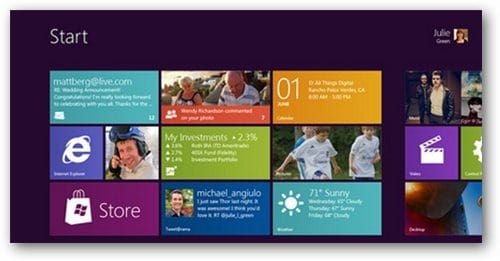
Windows 8 Tips and Tricks - Windows 8, a completely updated version of Windows from Microsoft, a lot of news recently in the field of technology. The interface much of Metro, enhanced features and integrated security tools are made to think about what the next generation desktop operating system will offer its end users. Microsoft's supporters are in love with the new graphical user interface of a meter, while others have criticized the new version. But ultimately, it comes down to personal taste and choice.

In order to use Windows 8 Simple for beginners, I have compiled a list of useful tips for Windows 8. I hope that you enjoy playing Windows 8

Windows 8 Tips and Tricks

# 1: Keyboard Shortcuts

Windows 8 has been added to some of the latest keyboard shortcuts, to preserve the old.

WIN + Q for the application of research, WIN + W for the search parameters, WIN + F to find files, WIN + I Parameters for the charm, WIN + S to block rotation, WIN + C to open the Start menu simple and time / date, win-win + A + Space to switch keyboard, WIN + SHIFT + C shows the charms touch bar, WIN + Y to look at your desktop, Win + Z shows the application bar.

It supports shortcuts too old - WIN + D active desktop WIN + R opens the race, Win + L locks the user, Win + E opens Explorer.

# 2: App Settings

The charm of the parameters in the sample applications on the specific application configuration. It helps to deepen!

# 3: Dark Theme

Are you a lover of dark matter? Use the Windows 8 black theme.

Go to Control Panel> Accessibility and turn on high contrast mode to see a theme of black screen at startup.

# 4: Semantic zoom

Hey! Is this a new target?

Enable semantic zoom zoom to find the App list, multi-touch.

# 5: Unlock

Locked Down?

Double press the mouse or press a key on the keyboard to unlock the lock screen instead of pulling up.

# 6: Bar Charms

Is not it lovely?

To show the house of the bar (from the configuration, stop, etc), click the lower left corner of the screen with the mouse, without pressing the key combination used or WIN + C.

# 7: I recently used applications

Wow! It's fast.

Smack your mouse to the left of the screen to display a thumbnail of the most recently used, then use the scroll wheel to see all open applications today.

# 8: Title Browse Groups

Jump, jump, jump!

Move the groups of tiles in the splash screen using Page Up and Page Down.

# 9: Tile lock or unlock

Bang! Fall off the screen.

Right click on the tabs on the shield to pin / deselect or remove applications from the tile.

# 10: Old Control

Mom! I want my old control panel back.

Do you miss the control panel interface of age? Was not it easier? The new interface, click Control Panel. Go to the bottom of the screen and click Settings. The control panel interface of age will be presented.

# 11: History file

Oops! I threw the wrong file.

History files, a feature built into Windows, offers a simple backup and restore process. Go to System Properties in Control Panel, select the history file and activate it (by default in Windows 8). It requires an additional drive to work.

# 12: Run 64-bit Internet Explorer 10

Open Internet Explorer Go to 10th Internet options menu and select the Security tab. Click the Enable 64-bit mode. Restart your browser.

# 13: Close Metro Applications

Err! Where is the close button?

8 metro Windows applications do not have a Close button. The applications are suspended in the background when you switch. They are automatically killed if you need more system resources.

# 14: Checking weather

A review of weather conditions included helps you to see current weather conditions in the selected city. Click Time to start the application. Right click and select Add city. Enter the name of your nearest city, and select from the list when it appears.

# 15: hibernation or sleep

Suspend or sleep mode is not available on Windows 8 by default. To restore them, to launch the applet Power Management (powercfg.cpl) and click on "Choose what the power buttons do" in the left panel. If you see "Change settings that are not available in the current" link, click it. Check the sleep and hibernate options. Click Save Changes.

# 16: Auto-Login

You will not see the login screen most? Type Netplwiz Run dialog box and press Enter. It sets up the user accounts dialog. Uncheck "Users must enter a user name and password to use this computer" and click OK. Enter the username and password for the account you want to connect automatically. Click OK and reboot.

# 17: Restore the Start menu

Again Mama! I want my old menu.

Run regedit and navigate to HKEY_CURRENT_USER \ Software \ Microsoft \ Windows \ CurrentVersion \ Explorer. Double-click RPEnabled, and change 1 to 0 to eliminate Metro, the new Task Manager, Start menu and much more. On the other hand, to RPEnabled to 2 to remove soil, restore the Start menu, but keep most of the other improvements.

# 18: Install from USB

Ah! Combustion is obsolete.

Use the Windows 7 USB / DVD Download Tool to install Windows from a USB memory 8. Direct the program Windows 8 ISO file and create a bootable Windows 8 installer on the USB drive.

# 19: Virtual Machine

Microsoft Hyper-V, a virtualization feature included, you can create and run virtual machines. Run OptionalFeatures.exe choose Hyper-V and click OK to activate it. The Metro-screen, locate and click Hyper-V Manager, the tiles begin to explore its potential.

# 20: Image Password

Go to Control Panel. Click on the Users> Create a password image, so you start. Select a picture and create a combo. You will need to produce the same combination of a login.

# 21: Hide the tape

Windows 8 is a multi-use tape while browsing the file system. If you are not comfortable with it, delete it. Go to Run, type gpedit.msc and press Enter. Go to Computer Configuration> Administrative Templates> Windows Components> Windows Explorer option. Double-click the "Start Windows Explorer with Ribbon minimized", set to Enabled and click OK.

# 22: Mount ISO

Windows 8 now offers integrated support for hosting the ISO file on a virtual drive. Clicking on any of the ISO file, select Install and installed files on a virtual drive.

# 23: Running 16-Bit App

Windows 8 is equipped with an applet that can run any old 16-bit. In order, select Control Panel> 16-bit, and possible.

You can download the Windows Developer 8 for testing Windows 8 best tips and tricks.
Read more »

Thursday, October 20, 2011

gratis telkomsel internet oktober 2011 gratis proxy

Ihsan Magazine Banyak sekali proxy gratisan internet telkomsel yang masih hidup dari sekian banyak Apn dan Proxy ada satu Proxy yang cocok sekali untuk saya Proxy Gratis Telkomsel 2011 Top PTC xtraboss com Internet Gratis Telkomsel High Anonymous Free Proxy Site This Information Can Be Used To Track The User However A Certain cara sms gratis dari internet cara sms gratis unlimited cara sms gratis sepuasnya cara kirim sms gratis ke semua operator trik sms gratis ke semua operator cara Now a lot of internet connections at low prices Discussed now is the way of sympathy Telkomsel unlimited internet connection is actually not common anymore kali ini triknya pake opera mini handler 5 dan modif proxy langsung aja setting di hp untuk trik internet gratis telkomsel opera mini oktober 2011 update Ihsan Magazine internet gratis Tips N Trik Trik Internet gratis Telkomsel Indosat Three Xl dengan Opera Mini 6 1 S60v2 Plus Trik Proxy 11 Oktober 2011 IP Proxy Address 222 50 96 14 8909 High Anonymous Country China Last Check 2011 10 14 18 27 59 IP Proxy Address 221 137 104 155 8909 High Anonymous Salam cybers Langsung saja set Proxy 69 63 181 11 dan Port 8000 Gunakan APN indosatm2 dan Homepage http the cybers skills blogspot com Trik di atas Free for Informasi terbaru tentang internet gratis telkomsel di pc april 2011 ada disini Untuk detail informasi tentang internet gratis telkomsel di pc april 2011 silahkan Photoshop Indiana Jones Poster Tutorial Photoshop Indiana Jones tutorial Well if you re a movie buff of any bearing you would be aware of the looming release of
Read more »

Saturday, October 15, 2011

25 backlink gratis setiap hari

Adalah sebuah layanan gratis SocialMonkey, yang menawarkan 25 backlink gratis setiap hari nya. Menurut saya cukup membantu dalam usaha seo yaitu, membangun backlink atau bahasa kerennya backlink builder, itu menurut teori. Namun kenyataannya, belum kerasa manfaatnya. Karena keterbatasan fasilitas member yang join dengan gratis, yaitu tidak bisa melihat laporan atau report kemana saja url yang kita submit tersebut di letakkan.

Penggunaannya mudah dan simple, bisa submit langsung melalui halaman submit di websitenya. Namun, lebih simple lagi jika menggunakan plugin yang di sediakan. Plugin tersebut bisa di integrasikan dengan browser mozilla firefox. Setelah plugin terinstall, buka halaman web/blog yang mau di submit, kemudian login dengan cara mengklik icon monyet di sudut kanan bawah firefox, login dengan email dan password kita.
Read more »

cara memainkan Payudara

Ah, payudara! Sungguh ciptaan yang sangat cantik dan erotis! Payudara tercipta dengan sempurna untuk membawa si empunya juga pasangan cintanya melayang nikmat dalam kebahagiaan, saat payudara “dimainkan” atau kalau saya bilang “disayang”.

Rekan pria, tips berikut ini akan mengajarkan anda bagaimana menyenangkan pasangan anda saat anda memainkan payudaranya, khususnya saat mengawali momen hubungan intim (foreplay).

Rekan wanita, sensitivitas dan rasa nikmat yang menjalar sekujur tubuh akan membuat anda semakin terlihat manja dan menggemaskan.


Catatan: Yang boleh praktek hanya yang telah menikah. Jika belum, simpan isi tulisan ini sebagai pengetahuan dan persiapan.


1. Beri Sentuhan Menerus ke Payudara
Sama dengan variasi bentuk dan ukuran payudara, terdapat juga variasi dalam permainan sex yang tiap-tiap pasangan sukai. Sebagian wanita senang ketika dirangsang dengan sangat hebat, sebagian lain lebih senang dengan sentuhan-sentuhan ringan dan lembut.

Penting untuk diingat: mainkan payudara secara simetris.

Payudara harus dimainkan secara bersama atau dengan lama waktu yang sama agar “tidak jealous” . Wah wah…jangan sampai si payudara satunya merasa diabaikan. Akibatnya gairah bercinta bisa padam. (Gawat!!!)


  • Mulailah dengan menyentuh dan meremas payudara dengan perlahan dan lembut. Dengan menyentuhkan telapak tangan secara terbuka ke seluruh area payudara. Cara ini cukup manjur untuk mengetahui kondisi payudara pasangan anda. Tapi yang pasti, memberikan kenikmatan padanya. Gunakan waktu anda saat itu untuk juga menikmati “rasa-rasa aneh” yang anda rasakan. Boleh anda gunakan minyak esensial untuk memijat agar gerakan anda lebih smooth, licin, dan hangat.


  • Lanjutkan dengan gerakan yang ritmis, berirama. Ulangi gerakan anda beberapa kali secara konsisten. Jika anda melakukan gerakan searah jarum jam, lakukan itu di kedua payudara. Atau coba gerakan ini: letakkan telapak tangan ke payudara dengan pusat telapak tangan tepat di putting dan areola. Gerakkan jari-jari tangan dengan gerakan memutar, kemudian gerakkan jari-jari ke arah puting dan akhiri dengan gerakan cubitan nakal ke putting. Ulangi beberapa kali. Ditanggung pasangan anda akan sangat senang dengan apa yang anda lakukan


  • Cermati bahasa tubuh pasangan anda.  Bertahan dan terus berikan perhatian pada suara dan gerak tubuhnya. Dari sini anda dapat mengetahui seberapa besar rangsangan yang anda berikan mampu memberikan kenikmatan pada pasangan anda. Anda dapat lakukan gerakan lain yang anda nilai pas dengan momen tersebut.


  • Jangan menduga, bertanyalah! Jangan ragu untuk bertanya pada pasangan anda, apakah yang anda lakukan “enak” menurut dia. Bertanyalah seperti: “ Sayang, lebih suka remasan lembut atau lebih kuat?”. Penting bagi anda untuk mengetahuinya agar acara ranjang anda tetap “HOT!”


  • 2. Enak Juga Untuk Dimakan
    Payudara begitu lezat, hingga anda selalu ingin memasukkannya ke mulut anda. Sekali anda telah “berkenalan” dengan payudara pasangan melalui sentuhan tangan, suasanapun menjadi hangat dan basah. Ya, saya menyebutnya oral loving. Mulailah mengeksplor payudara pasangan dengan mulut 
    anda…

    • Mulailah dengan jilatan kecil di sekitar areola, lihat antisipasi yang diberikan pasangan anda. Kemudian perlahan bergeraklah menuju puting.
    • Secara bertahap ubahlah gerakan mulut dari menjilat ke menghisap – hmm, yummy!
    • Eksperimen dengan gigitan-gitan kecil yang nakal. Jika pasangan anda telah ‘turn-on”biasanya akan meminta hisapan yang lebih kuat dan atau diselingi gigitan.
    • Hembuskan nafas anda ke puting. Buat pasangan tesenyum. Kembali anda hisap dan gigit payudaranya. Sayang, geli akh…!
    • Dalam waktu yang sama! Saat mulut anda menikmati satu payudara, jangan abaikan payudara satunya. Gerakkan tangan anda untuk menggodanya. Dengan “menyayang” payudara pasangan dengan mulut anda, dia akan tahu bahwa payudaranya “memang enak untuk anda makan.”

    3. Permainan Ekstra Sensorik 
    Rekan pria, kreativitas merupakan kunci sukses anda dalam menggugah gairah bercinta pasangan. Dan…gawatnya, ibarat seniman, payudara pasangan merupakan kanvas ideal untuk menuangkan ide-ide kreatif anda.

    Pada permainan ekstra sensorik ini anda akan membutuhkan beberapa alat pendukung:

    a. Bermain geli-gelian. Goda payudara dan puting pasangan dengan mainan yang berbulu-bulu, Sentuhan yang sangat lembut dari bulu akan membuat pasangan sangat senang. Apalagi kalau anda memasangkan blindfold (kain penutupp mata). Sentuhan yang tiba-tiba, tanpa dia ketahui sungguh merupakan rangsangan yang hebat. Dia akan minta ampun kegelian yang justru membuat anda lebih gemas untuk menggodanya.

    b. Bermain panas-dingin. Tuangkan sedikit minyak pijat yang menghangatkan di payudara pasangan. Pijatlah dengan perlahan dan lembut. Percayalah, si dia akan mendapatkan pengalaman erotik yang hebat. O iya, anda juga dapat bermain di temperatur rendah. Usapkan es di puting payudaranya. Bibirnya pasti berbisik, aah….eehh… Dinginnya es ternyata mampu menyengat syaraf puting payudara sampai ke sekujur tubuhnya. Putingnya pun segera ereksi dan mengeras. Pakai ice-cream juga oke, segera setelah anda oleskan ice-creamnya, nikmati payudara with ice-cream topping! Hmmm…very delicious!

    c. Bermain rasa buah dan cokelat. Anda dapat berikan krim cinta (love cream) ke areola dan puting payudara pasangan. Jangan banyak-banyak, nanti malah belepetan. Setelah itu mulailah anda jilati payudara pasangan. Sruup…strawberry, chocolate, grape, mixed fruit! Terserah anda. Atau kalo tidak ada krim cinta, boleh dicoba, selai roti (ambil dulu di meja makan, donk?!)

    4. Permainan Mendandani Payudara
    Rekan pria, jika payudara dibawa ke ranah fesyen, pastilah payudara senang menjadi Si Bola-bola Cantik. Nah…penjepit payudara (sex toy) merupakan satu permainan yang dapat dipakai saat bermain”dandan-dandanan” dengan obyek payudara pasangan.

    Jepitan dan tekanan yang diterima puting akan memberikan pengalaman sensasional. Perlu anda ketahui bahwa saat tubuh kita terangsang (pria dan wanita), maka tubuh akan lebih mampu menahan rasa sakit. Puting sebagai contohnya – banyak wanita yang meminta pasangannya untuk memencet atau menghisap putingnya dengan sangat kuat saat mereka benar-benar telah “turn-on” dan siap berhubungan intim.
    Read more »